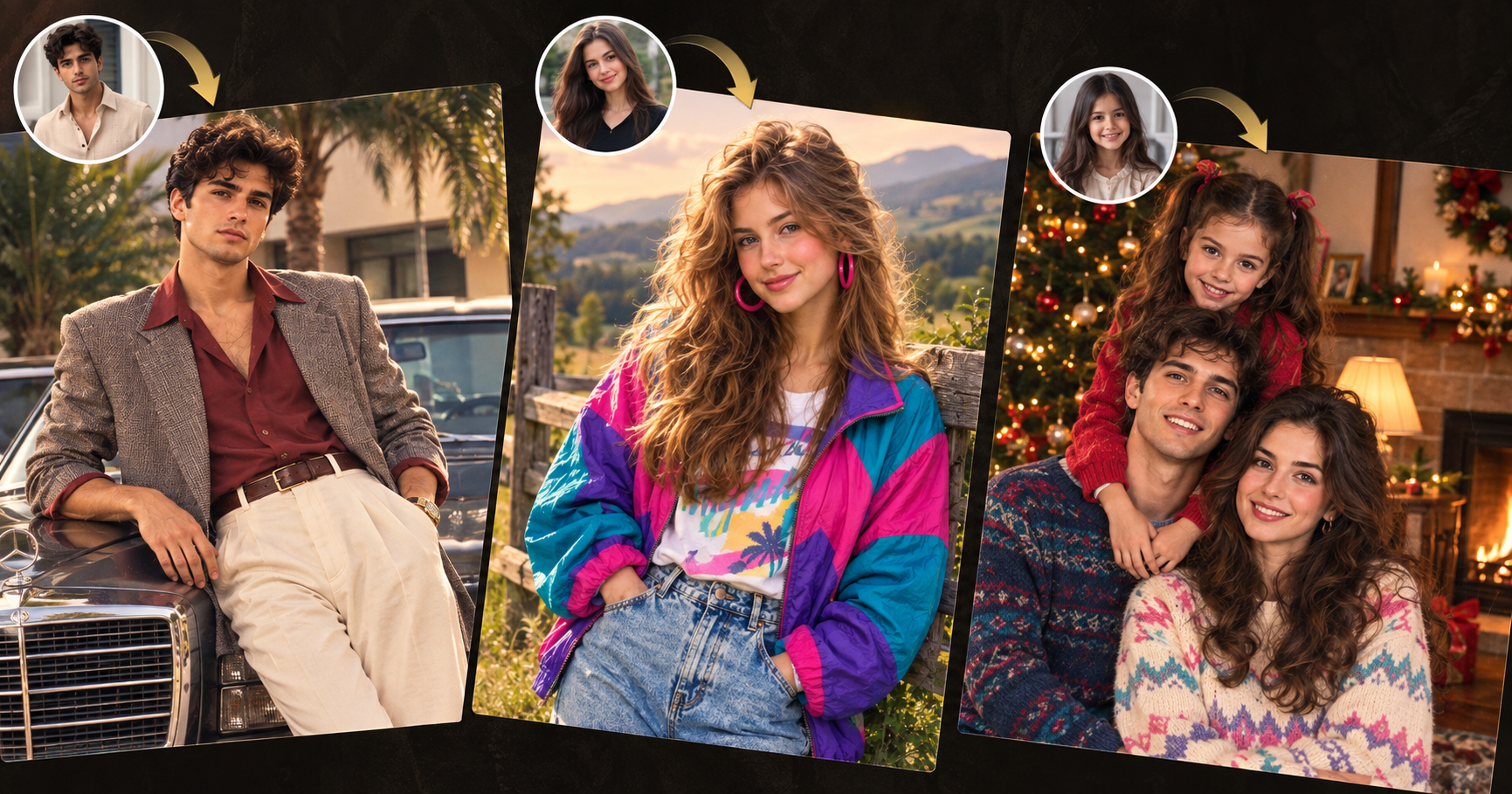
Create realistic 80s AI photos with ready-to-use prompts for Retro fashion, Vintage family Christmas images and Elegant Retro portraits. Learn how to get authentic clothing, lighting, film grain and 1980s photography.
The 1980s are having another moment.
From colorful windbreakers and high-waisted denim to warm family photographs, classic cars, analog film grain, and polished editorial fashion, the decade offers several very different visual styles to explore with AI.
But creating a convincing 80s AI image is not as simple as typing:
Create an 80s photo.
That instruction leaves too much open to interpretation.
An AI image generator may give you neon grids and Synthwave graphics when you actually wanted a realistic Vintage family photograph. Or it may create an exaggerated costume look when your goal was an Elegant Retro fashion portrait.
The difference usually comes down to the prompt.
A strong 80s AI image prompt should explain more than the decade. It should describe the clothing, environment, lighting, photography style, film texture, colors, and overall mood you want.
In this guide, we will use three very different 80s-inspired image styles and provide ready-to-use prompts for each:
Colorful Retro outdoor fashion photography, a nostalgic Vintage family Christmas photograph, and an Elegant Retro portrait beside a classic luxury car.
You can use these prompts as they are, adapt them to your own idea, or use them with a reference photo to transform yourself into a different era.
Why Are 80s AI Images Trending?
The 1980s had a visual personality that is difficult to mistake for another decade.
Fashion was expressive.
Photography was less digitally perfect.
Colors could be bold, but family and lifestyle photographs often had warm, slightly faded tones.
Consumer film cameras introduced natural grain, soft focus, flash falloff, color shifts, and small imperfections that are largely absent from modern smartphone photography.
That imperfection is part of the appeal.
Modern images can be extremely sharp and polished. A Retro or Vintage photograph feels different because it appears to have history behind it.
The 80s aesthetic can work especially well for fashion portraits, social media content, personal photo transformations, family album concepts, editorial shoots, lifestyle visuals, creative campaigns, album covers, and nostalgic storytelling.
However, there is no single “80s look.”
A bright outdoor fashion portrait, a Christmas family snapshot, and a luxury lifestyle image can all belong to the same decade while looking completely different.
That is why choosing the correct visual direction is more useful than filling a prompt with dozens of Retro keywords.
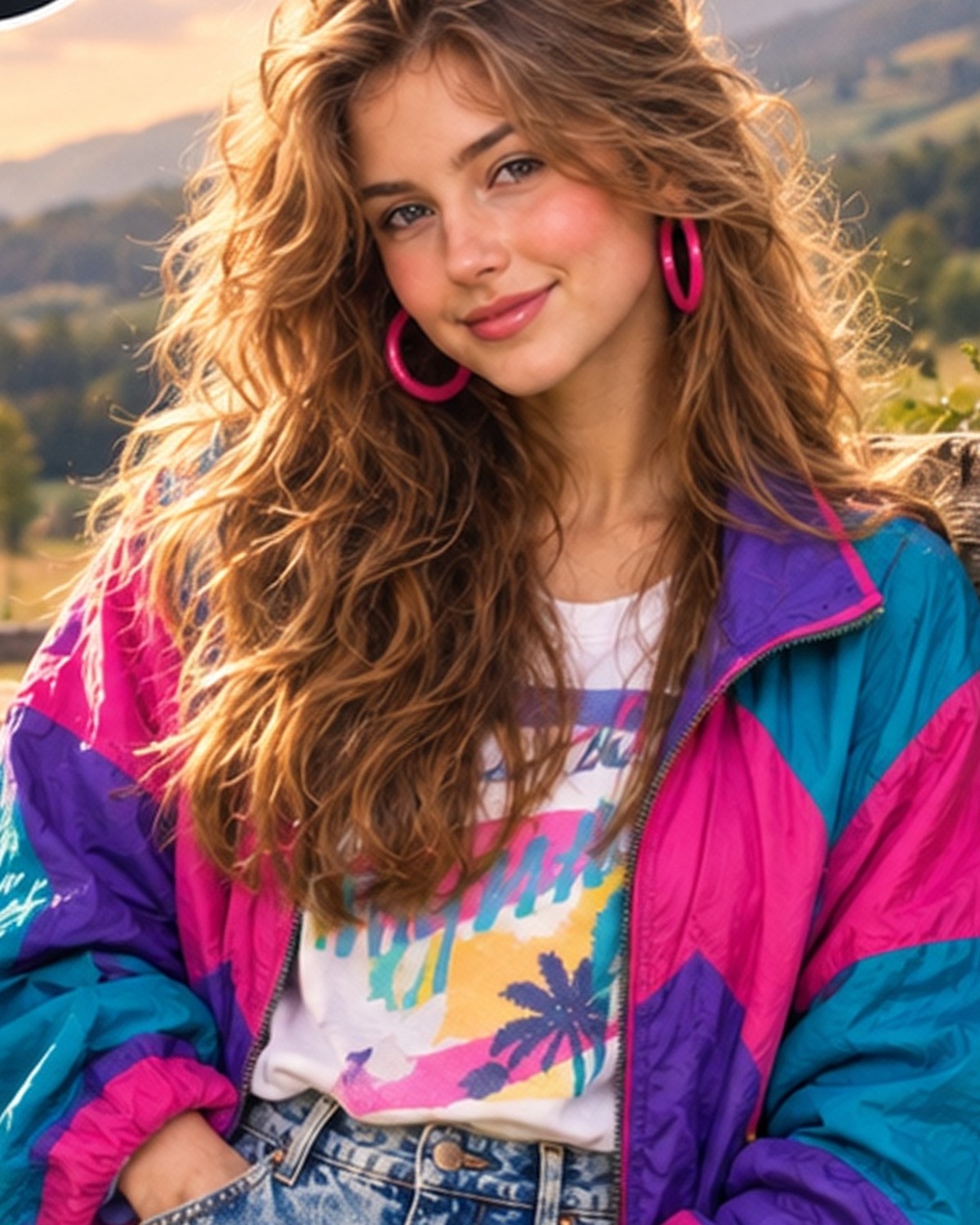
1. Colorful 80s Retro Outdoor Fashion Portrait
The first look represents the colorful and expressive side of late-1980s fashion.
A bright color-block windbreaker, high-waisted jeans, bold accessories, voluminous hair, and a relaxed outdoor environment immediately create a recognizable Retro feeling.
At the same time, the image does not rely on neon grids, futuristic landscapes, or arcade graphics.
That is an important distinction.
Retro photography does not have to mean Synthwave.
For a realistic outdoor 80s portrait, natural lighting and period-inspired clothing can be enough.
What Creates This Retro Look?
Element | Recommended Direction |
|---|
Clothing | Bright color-block windbreaker |
Bottoms | High-waisted light-wash denim |
Accessories | Bold hoop earrings |
Hair | Voluminous layered 80s hairstyle |
Environment | Countryside, field or rustic fence |
Lighting | Warm natural afternoon sunlight |
Camera Look | Consumer 35mm film |
Texture | Fine grain and slight softness |
Mood | Casual, youthful and nostalgic |
The contrast between a peaceful natural background and expressive clothing is what makes this style particularly effective.
The environment should support the subject rather than compete with it.
Prompt for a Colorful 80s Retro Portrait
Create a realistic late-1980s outdoor fashion photograph of a young adult woman standing casually beside a rustic wooden fence in a peaceful countryside setting. Give her voluminous layered 1980s hair, bold colorful hoop earrings, a bright color-block windbreaker in turquoise, magenta and purple, a casual vintage-inspired top, and high-waisted light-wash denim jeans. Use warm natural afternoon sunlight with soft highlights on the hair, a gently blurred green field and forest in the background, realistic skin texture, subtle analog film grain, slightly faded colors and mild natural softness. Make the photograph feel like it was captured on a consumer 35mm camera in the late 1980s. Keep the pose relaxed, confident and natural. Avoid futuristic objects, strong neon effects, modern smartphones, contemporary vehicles, visible modern branding and overly polished digital photography.
Short Prompt Version
Realistic late-1980s outdoor fashion portrait, bright turquoise-magenta-purple windbreaker, high-waisted light denim, bold hoop earrings, voluminous 80s hair, rustic countryside fence, warm afternoon sunlight, faded analog colors, subtle 35mm film grain and natural vintage photography.
The shorter version can work well when your image generator responds better to concise instructions.
How to Use Your Own Photo for This Style
If you are uploading a personal photo, the prompt should make it clear that the person's identity should remain recognizable.
Add:
Preserve the person's identity, facial structure, skin tone, age and recognizable facial features. Change only the hairstyle, clothing, accessories, environment, lighting and photographic treatment to create an authentic late-1980s look.
This prevents the AI from treating your photo as loose inspiration and creating a completely different person.
Ways to Customize This Retro Prompt
The clothing can remain similar while the background changes.
For a small-town version, use a quiet street with older storefronts and period-appropriate parked cars.
For a summer version, place the subject near a beach boardwalk with faded sunlight and subtle coastal colors.
For a yearbook-inspired look, use a simple campus setting, natural daylight, and slightly softer consumer-film photography.
The key is to keep the visual language consistent.
A colorful windbreaker beside a countryside fence feels believable.
The same subject standing inside a futuristic cyberpunk city would create a completely different style.
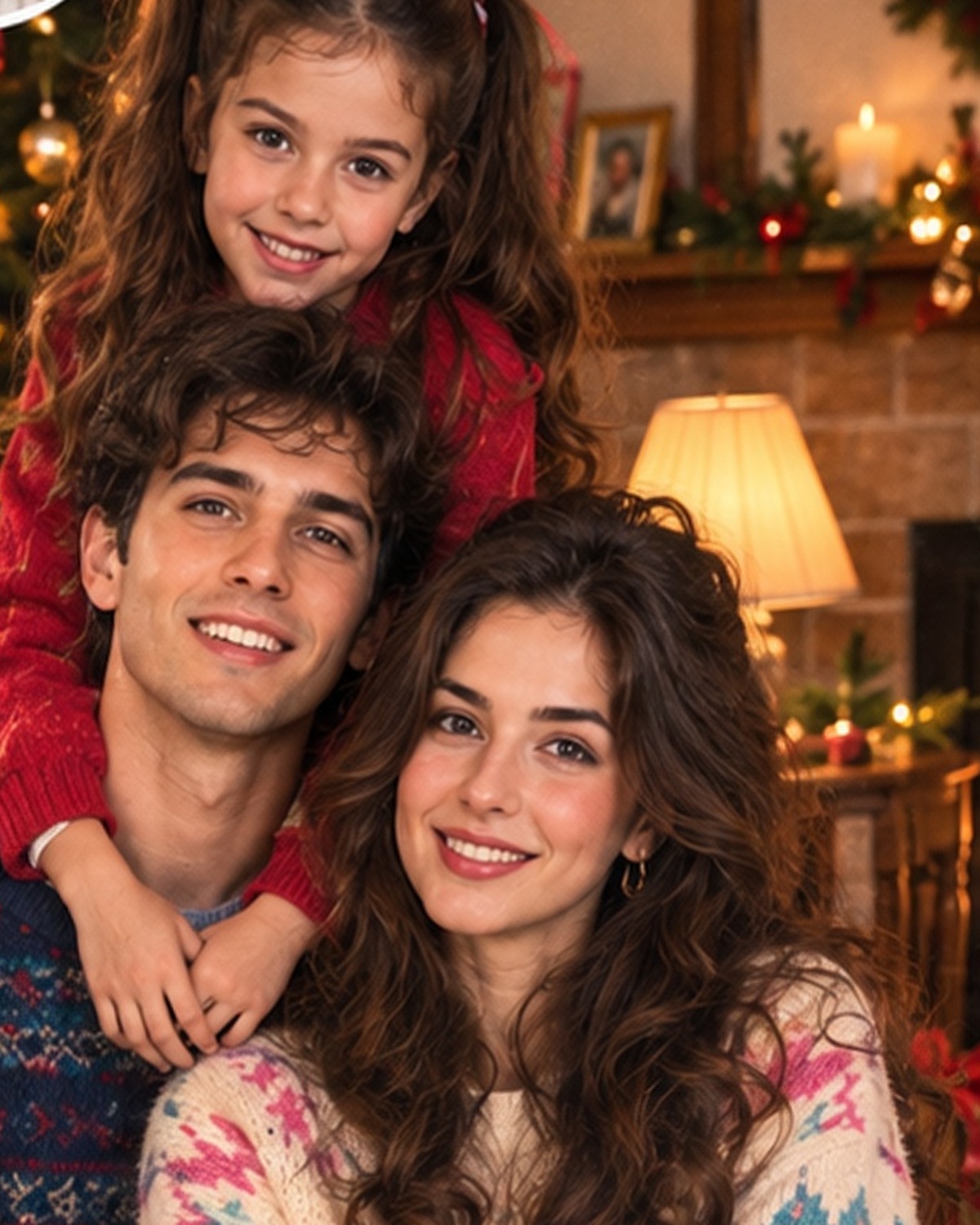
2. Vintage 1980s Family Christmas Photo
The second image represents a much more personal side of the decade.
Instead of bold fashion, the focus is warmth, family, tradition, and the slightly imperfect quality of old household photographs.
This is where the word Vintage becomes especially useful.
A Vintage family image should not feel like a professionally lit holiday advertisement.
It should feel like somebody discovered an old photograph inside a family album.
That means the imperfections matter.
Warm indoor lighting, consumer-camera softness, patterned sweaters, traditional decorations, wrapped gifts, wooden furniture, framed photographs, and natural family posing all contribute to the result.
What Makes a Family Photo Feel Vintage?
Element | Vintage Direction |
|---|
Setting | Cozy family living room |
Clothing | Patterned knit sweaters |
Decorations | Traditional Christmas tree and garlands |
Lighting | Warm lamps, tree lights and fireplace glow |
Camera | Consumer 35mm camera |
Colors | Warm cream, red, green and brown |
Texture | Grain, softness and slight fading |
Pose | Natural family positioning |
Mood | Intimate, nostalgic and warm |
One of the most common mistakes when creating Vintage AI photographs is making everything too perfect.
The room is too symmetrical.
The lighting is too cinematic.
Every object looks styled.
The skin is excessively smooth.
The result may look attractive, but it does not feel like an authentic family snapshot.
For this style, slight imperfection actually improves realism.
Prompt for a Vintage 1980s Family Christmas Photo
Create an authentic late-1980s family Christmas photograph inside a warm and cozy middle-class living room. Show two adult parents with their young child posing naturally together near a fully decorated Christmas tree. Dress the family in believable 1980s winter clothing and patterned knit sweaters using cream, navy, teal, pink and burgundy tones. Include traditional Christmas ornaments, colorful string lights, wrapped presents, garlands, a fireplace, wooden furniture, framed family photographs and period-appropriate holiday decorations. Use warm tungsten indoor lighting mixed with Christmas-tree lights and soft fireplace glow. Make the photograph feel like it was captured with a consumer 35mm film camera, with subtle analog grain, soft focus, slightly faded warm colors, mild overexposure and small photographic imperfections. Keep the family's expressions affectionate and natural. The final image should resemble a genuine photograph found in an old family Christmas album rather than a modern professional holiday shoot.
Short Prompt Version
Authentic late-1980s family Christmas photograph, parents with child in patterned knit sweaters, decorated Christmas tree, fireplace, wrapped gifts, warm household lighting, traditional living room, soft 35mm film grain, slightly faded colors and nostalgic family-album photography.
How to Make the Family Photo Look More Authentic
If your first result looks too modern, add:
Avoid modern minimalist interiors, LED holiday lighting, contemporary clothing cuts, ultra-sharp digital photography, excessive skin smoothing and commercial studio lighting.
Another helpful phrase is:
Use slightly imperfect framing and natural family positioning.
Old family photographs were not always perfectly composed.
Someone might be slightly closer to the camera.
A lamp might be visible in the background.
The Christmas tree may not be perfectly centered.
These details can actually make the image more convincing.
Christmas Morning Variation
For a more candid result, change the prompt to:
Show the family casually opening presents near the Christmas tree in comfortable late-1980s pajamas and winter sweaters. Use natural expressions, slightly messy gift wrapping, warm morning light mixed with Christmas-tree lights and the appearance of a candid consumer-film photograph.
This works well when you want a memory rather than a formal portrait.
Larger Family Album Variation
For a multi-generation scene:
Create a late-1980s Christmas family photograph showing grandparents, parents and children gathered closely together inside a warm living room. Include traditional furniture, patterned knitwear, wrapped presents and a decorated Christmas tree. Use direct consumer-camera flash, soft film grain, warm faded colors and slightly imperfect framing.
Direct flash can be especially effective for recreating the look of old indoor photographs.
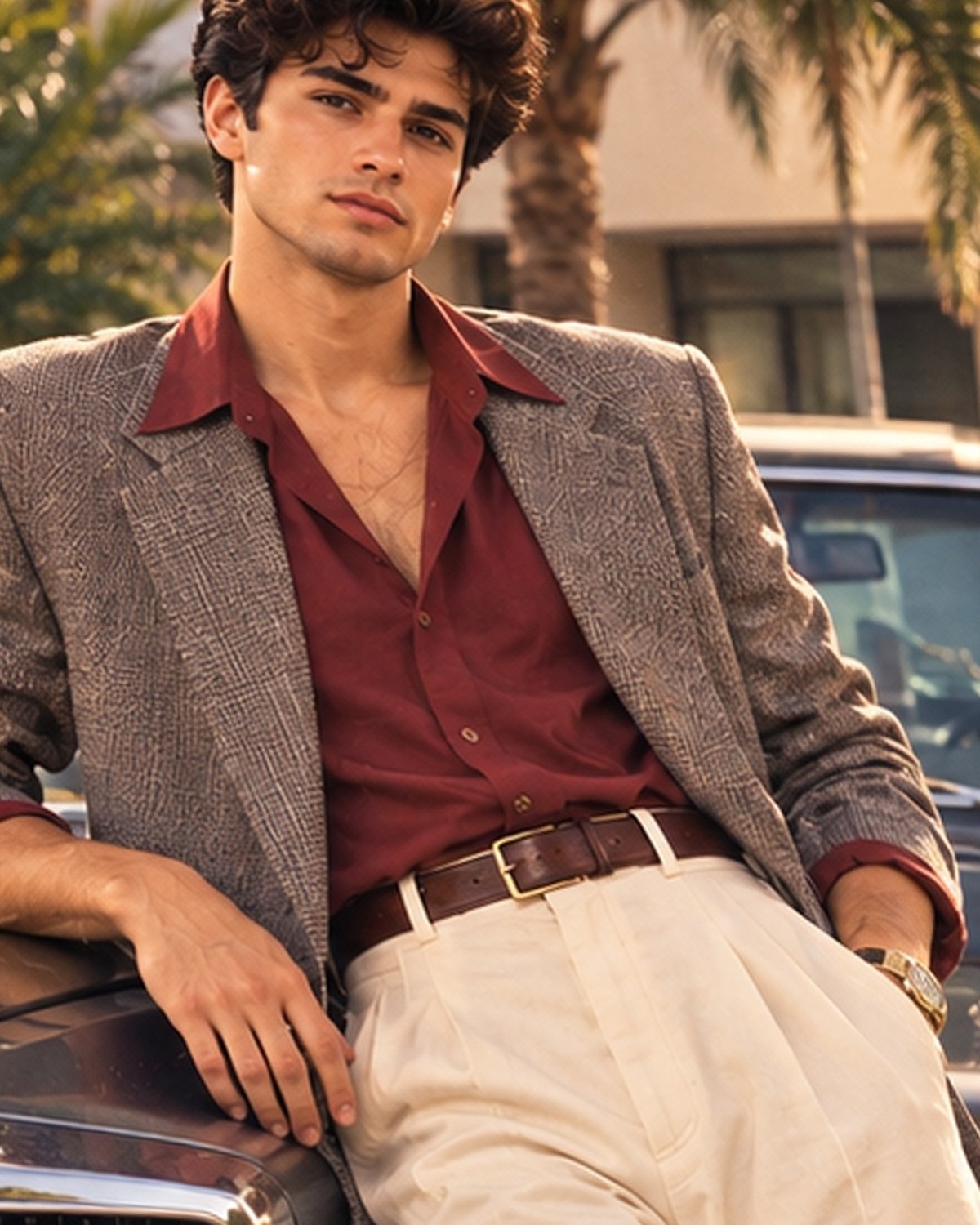
3. Elegant Retro Portrait with a Classic Luxury Car
The third style moves away from playful Retro and family Vintage photography.
This is Elegant Retro.
Elegant Retro takes visual inspiration from a previous era but presents it in a more polished and sophisticated way.
Instead of colorful windbreakers or Christmas sweaters, think tailored blazers, high-waisted trousers, deep burgundy shirts, understated gold accessories, classic luxury cars, clean architecture, and warm editorial photography.
It is nostalgic without becoming exaggerated.
Key Elements of Elegant Retro
Element | Recommended Direction |
|---|
Jacket | Textured taupe or gray blazer |
Shirt | Deep burgundy open-collar shirt |
Trousers | High-waisted cream pleated trousers |
Accessories | Leather belt and classic watch |
Vehicle | Dark 1980s luxury sedan |
Setting | Upscale villa or hotel |
Background | Tropical greenery and clean architecture |
Lighting | Warm natural daylight |
Texture | Subtle film grain |
Mood | Refined, confident and cinematic |
This kind of image is useful for fashion concepts, lifestyle visuals, personal branding, editorial photography, and premium Retro campaigns.
Prompt for an Elegant Retro Male Portrait
Create a realistic Elegant Retro portrait inspired by sophisticated 1980s lifestyle and fashion photography. Show an adult man leaning casually against a dark classic 1980s luxury sedan outside an upscale villa or hotel entrance. Give him neatly styled dark wavy hair and natural light facial hair. Dress him in a textured taupe or gray blazer with casually rolled sleeves, a deep burgundy open-collar shirt, high-waisted cream pleated trousers, a brown leather belt and a classic gold wristwatch. Use warm natural daylight, soft shadows, realistic skin texture, slightly muted analog colors and subtle film grain. Keep the pose relaxed, confident and refined, similar to an editorial photograph from a premium 1980s lifestyle magazine. Include tropical greenery and clean upscale architecture in the background. Avoid contemporary vehicles, modern streetwear, smartphones, futuristic architecture, excessive neon effects and overly sharp digital photography.
Short Prompt Version
Elegant Retro 1980s male fashion portrait beside a dark classic luxury sedan, textured gray blazer, burgundy open-collar shirt, cream pleated trousers, classic watch, upscale villa, tropical greenery, warm daylight, muted analog tones and subtle vintage film grain.
Why This Style Looks Different from Typical Retro Images
Retro is often associated with bright colors.
Elegant Retro works differently.
It relies on restraint.
The colors can be muted.
The clothing is more tailored.
The car looks classic rather than flashy.
The background feels premium.
The film effect is subtle.
This means you do not need to add neon grids, VHS graphics or glowing purple skies just because the prompt refers to the 1980s.
Sometimes the strongest Retro image is the one that looks like a real editorial photograph from the era.
Elegant Retro Mediterranean Variation
Try:
Create a sophisticated 1980s lifestyle portrait of a man beside a classic European luxury sedan outside a Mediterranean villa. Dress him in cream pleated trousers, a deep burgundy open-collar shirt and a textured neutral blazer. Use warm late-afternoon sunlight, elegant posture, natural skin texture, muted analog film colors and subtle grain.
Elegant Retro Business Variation
For a stronger executive look:
Create a premium 1980s business lifestyle portrait of a confident man beside a dark luxury sedan outside an upscale office building. Use tailored trousers, a structured blazer, open-collar shirt, understated gold watch, warm natural daylight and subtle vintage editorial film texture.
This variation works particularly well when the goal is professional rather than nostalgic.
Retro vs Vintage vs Elegant Retro
These three example images show why choosing the correct style keyword matters.
Style | Best For | Key Characteristics |
|---|
Retro | Fashion and creative lifestyle images | Bold colors, period-inspired styling |
Vintage | Family and memory-style photography | Faded colors, film grain, authentic imperfections |
Elegant Retro | Premium fashion and lifestyle portraits | Tailoring, classic cars, refined colors |
Synthwave | Graphic 80s-inspired artwork | Neon, grids, futuristic sunsets |
A Retro AI image prompt does not always need to look old.
A Vintage AI image prompt usually benefits from photographic aging.
An Elegant Retro prompt should keep nostalgia subtle.
Choosing the correct term can replace several lines of unnecessary explanation.
A Simple Formula for Writing Your Own 80s AI Image Prompt
You do not need an extremely long prompt to create a convincing image.
A useful structure is:
Subject + Clothing + Environment + Era + Lighting + Film Treatment + Mood
For the first image:
Woman + colorful windbreaker + countryside + late 1980s + warm afternoon sun + consumer 35mm grain + playful Retro mood.
For the second:
Family + patterned sweaters + Christmas living room + late 1980s + warm tungsten light + faded 35mm film + nostalgic family mood.
For the third:
Man + tailored blazer and pleated trousers + classic luxury car + 1980s + warm daylight + subtle analog film + Elegant Retro mood.
This structure gives the AI enough information without repeating the same idea several times.
Photography Terms That Can Improve 80s AI Images
When you want a realistic image rather than an illustration, photography terminology can make a noticeable difference.
Desired Effect | Prompt Phrase |
|---|
Old family snapshot | Consumer 35mm film photography |
Natural film texture | Fine analog film grain |
Older printed-photo feel | Slightly faded photographic print |
Indoor Christmas photo | Warm tungsten lighting |
Candid indoor look | Direct consumer-camera flash |
Fashion editorial | Vintage editorial photography |
Outdoor Retro portrait | Golden-hour film photography |
Less digital perfection | Subtle photographic imperfections |
Softer old-camera feel | Natural lens softness |
You do not need to use all of these terms.
Choose only the ones that match your concept.
How to Make AI Images Look More Like Real 1980s Photographs
Clothing is only one part of the result.
If you dress someone in an 80s outfit but use ultra-sharp modern photography, the image can still feel contemporary.
For a stronger Vintage result, focus on the photograph itself.
Try phrases such as:
slightly faded analog colors
natural film grain
mild highlight bloom
soft consumer-camera focus
subtle color shift
slight print imperfections
natural skin texture
gentle overexposure
Another useful instruction is:
Make the image feel like a scanned photograph from an old album rather than a modern digital image with a Vintage filter.
This is particularly useful for family photographs.
Common Mistakes in 80s AI Image Prompts
One common mistake is using too many similar words.
A prompt does not need:
Retro, Vintage, nostalgic, old-school, classic, aged, antique, analog 80s style.
Choose the terms that actually describe the result.
Another mistake is mixing styles that do not belong together.
For example:
Elegant Retro, cyberpunk, countryside, luxury editorial, neon arcade, family album.
Each phrase points the AI in a different direction.
A clearer prompt will usually produce a more coherent image.
The environment also matters.
An 80s outfit photographed inside an ultra-modern glass office may not look convincingly Retro.
Think about the entire scene.
Clothing.
Architecture.
Furniture.
Cars.
Accessories.
Lighting.
Photography style.
They should all support the same era.
Should You Use a Reference Image?
A reference image can be extremely useful.
Words such as Retro, Vintage and Elegant Retro are open to interpretation.
A visual reference can communicate details that are difficult to explain in text, such as the exact color mood, fashion styling, lighting direction, composition, film texture, and overall atmosphere.
When transforming your own photo, use:
Preserve my identity, facial features, skin tone, age and recognizable appearance. Use the reference only for visual direction, clothing, environment, lighting and photographic treatment.
The objective should be to preserve the person while changing the era and styling.
Negative Prompt for More Realistic Results
If your AI generator supports negative prompts, you can use:
modern smartphones, contemporary vehicles, futuristic technology, modern logos, excessive neon, cyberpunk elements, ultra-smooth plastic skin, extra fingers, distorted hands, deformed faces, excessive HDR, oversharpened digital photography, random text, watermarks
For the family Christmas image, also avoid:
minimalist modern furniture, LED strip lighting, contemporary Christmas decorations
For the Elegant Retro portrait, avoid:
modern sports cars, contemporary streetwear, futuristic architecture
This helps reduce details that can break the illusion of the era.
Final Thoughts
Creating a convincing 80s AI image is not about adding every Retro keyword you can think of.
It is about choosing the right visual direction.
A colorful countryside portrait needs expressive fashion, natural light and consumer-film texture.
A Vintage Christmas photograph needs warmth, believable family styling and the imperfections of an old household camera.
An Elegant Retro portrait needs restraint, tailoring, a classic environment and sophisticated analog photography.
Before writing your next prompt, ask yourself:
What kind of 80s image am I actually trying to create?
Once the answer is clear, describe the subject, clothing, setting, lighting and photographic treatment that support that idea.
Then let the AI handle the transformation.
Whether you want a bright Retro fashion portrait, a nostalgic Vintage family photograph, or a sophisticated Elegant Retro image, the prompts above can give you a practical starting point.
The goal is not simply to make an image look old.
It is to make it feel like it belongs to another time.